EGOCMS version 26 is a rolling release! This means that you can update from EGOCMS version 25 to version 26 without migration.
Please note the minimum requirements of your system environment
New design
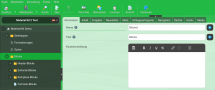
EGOCMS version 26 provides a new design for the admin area. All familiar control elements and layouts have been retained.
Only the presentation and the icon set used have changed.
In addition, many tabs now have a help icon at the bottom, which takes you directly to the appropriate help page in our EGOCMS online help.
New archives
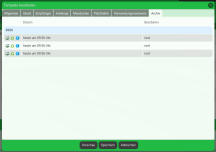
EGOCMS version 26 introduces archives for the following objects:
- Page rights
- User rights
- User settings
- Group settings
- Role settings
- Workflow settings
- E-mail template settings
The EGOCMS system migration automatically creates all the new tables required for these archives in the database.
Further details can be found in our EGOCMS online help.
If you have any further questions
Features
- Image conversion to JPEG XL(JXL) is supported.
- Image conversion to WebP is always activated by default.
- The display of the Mediapool tools has been changed.
- Rewrite2: The complete path can also be changed via the meta URL.
- The display of the Link input plugin has been extended to show the name of the selected page directly.
- The Color input plugin now has the transparency parameter, which can be used to set a colour with transparency.
- Many date displays in the admin area show the relative date. The ISO date is displayed as a tooltip on mouseover.
- The system service performs a daily recalculation of the complete search index (only if Elasticsearch is used). If this is not desired, this action can be deactivated via Administration > System > System service.
- Frontend Administration: the EGOCMS standard filter for pasted content from the clipboard can be deactivated(details).
Compatibility
- TinyMCE update to version 8.3.2.
Performance
- Browsing through the user administration as a non-superuser has been accelerated.
- The available DeepL glossary languages are written to the cache and therefore queried less frequently.
Security
- All standard search page types always set the value none for meta robots.
EGOCMS PHP Imagick and ImageMagick 7
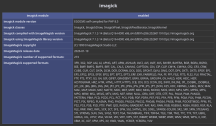
In addition to WebP, the EGOCMS also supports automatic conversion to the modern image formats Avif and JPEG XL. For image conversion, the EGOCMS uses the PHP module Imagick and this uses the ImageMagick tool. However, the currently available PHP Imagick version is only supplied with ImageMagick version 6.
However, ImageMagick version 7 offers support for conversion to JPEG XL. In addition, this version also solves bugs, such as the display of transparencies in Avif images. Version 7 also contains security fixes for problems with version 6. Overall, image conversion to the Avif and JPEG XL image formats is so fast that external tools no longer need to be used.
- EGOTEC delivers a self-compiled PHP Imagick module with ImageMagick version 7 in the EGOCMS image. If you are not using the EGOCMS image and would also like to utilise the advantages of ImageMagick 7 in EGOCMS, you will find instructions on how to compile PHP Imagick yourself in our online help.
If you would like more information about our
EGOCMS Docker Image.
We will be happy to advise you.
The old EGOCMS URL generation(Rewrite1, classic folder structure) is classified as obsolete with EGOCMS version 26 and is scheduled for deletion with the next EGOCMS major release (e.g. version 27). Please plan a changeover to the new EGOCMS URL generation(Rewrite2, customisable folder structure) if you are not already using it. If you have any questions, please contact our EGOCMS Support.
For questions about support with the update,
technical questions,
you are welcome to
EGOCMS 26 requirements
When changing to EGOCMS version 26, a few requirements must be taken into account. A system update is automatically denied if certain requirements are not met. The following information can also be found in our EGOCMS online help.
1. PHP 8.2 to PHP 8.5
EGOCMS version 26 now supports PHP 8.5. As a result, EGOCMS support for outdated PHP versions has been discontinued. The following PHP versions are no longer supported: 7.4, 8.0 and 8.1. These versions are all marked as end of life by the PHP team.
To be able to switch to EGOCMS version 26, you must have at least PHP 8.2 installed. EGOTEC recommends using the latest PHP version 8.5. Please refer to the official information on supported PHP versions.
- If your EGOCMS installation uses the EGOCMS image, PHP 8.5 is automatically delivered and set as the default.
- When switching to a new PHP version, you may need to check compatible changes in PHP for your scripts.
2 Elasticsearch 9.2
If you are using Elasticsearch, EGOCMS version 26 requires at least Elasticsearch version 9.2. Please note that your existing Elasticsearch search index can only be transferred when switching to Elasticsearch 9.2 if you previously used at least Elasticsearch 8.19.0. If you are using a lower version of Elasticsearch, you must delete the search index completely (if you are using an Elasticsearch Docker image, you may even have to delete the entire Elasticsearch volume).
The EGOCMS system migration does not automatically recalculate the Elasticsearch search index when switching to EGOCMS version 26. This must be recalculated manually.
3. minutely system service
EGOCMS version 26 changes the handling of cronjobs set on the server. Previously it was necessary to set the time intervals at which EGOCMS services should be executed via cronjobs on the server. From EGOCMS version 26, these time intervals are set directly in EGOCMS.
This only requires a cronjob on the server, which executes the EGOCMS system service every minute. Example:
* * * * * * curl -d "userid=..." https://localhost/bin/cron/cron.php
In the global settings, under the Services tab, you can now set an interval for each EGOCMS service. This interval supports the common crontab syntax. In addition, EGOCMS version 26 now allows the definition of up to 10 services.
Please note that the old syntax in the interval field is no longer supported and is considered invalid. This has no direct effect and only ensures that only informative displays, such as when the next live synchronisation will take place, no longer work. The calculation of the current server load may then also be inaccurate.
- Changing the cronjobs is not absolutely necessary for the change to EGOCMS version 26, but is recommended by EGOTEC as soon as possible. Your old cronjobs will continue to work in the meantime.
- When defining services in a cron.ini file, minutely is now available in addition to the interval short forms monthly, weekly, daily, hourly.
If you have any further questions